

A reliable tour-and-move-in engine is your community’s most vital department. If you’re not out there booking tours, building trust with families, and turning those tours into move-ins, the community down the street will do it instead.
The good news is that filling apartments becomes far more manageable once you focus on the few levers that reliably raise occupancy.
Pour a cup of coffee and let’s get into the nitty-gritty of 27 tactics you can start using right away to drive more tours and move-ins.
Foundations You Can’t Skip
Start here. These basics decide whether marketing turns into booked tours and move-ins or disappears into “we think it’s working.”
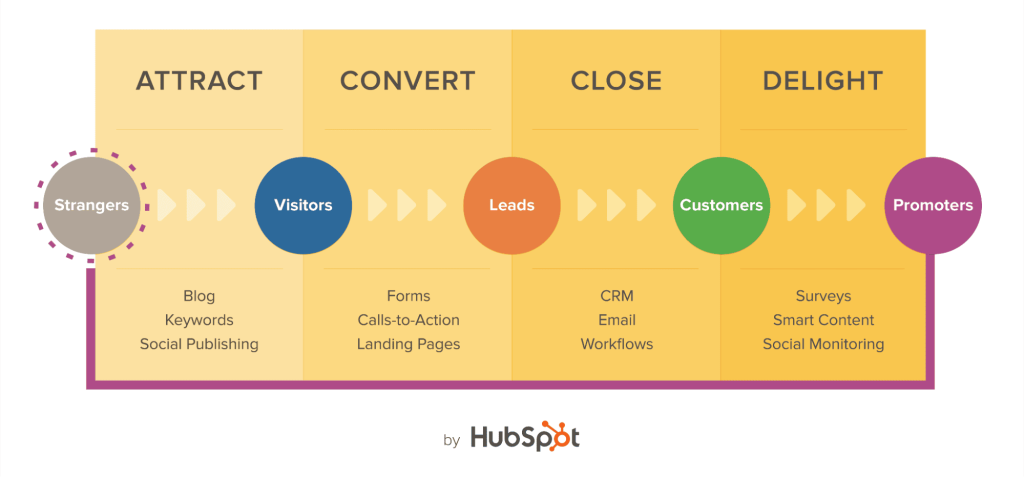
1. Track the path from spend to move-ins
If you can’t see the path, you can’t improve it. Map five simple stages in your CRM: Lead; Qualified; Booked Tour; Showed; Move-in. Capture source, campaign, and landing page on every record. Use a unique phone number for your header, another for GBP, another for paid search so you know which channel rang the phone.

Make “Booked Tour” a real calendar event so show rate stops being a guess. Review one page every Monday: booked tours by channel; tour→move-in; cost per move-in. Decisions get easy when a line says “this campaign produced three move-ins last month.”
2. Make the website easy to act on
Families are stressed; most are on mobile. If the path to book is fuzzy, they bounce. Keep structure clean: one H1; clear H2s; readable text; strong contrast. Put “Book a Tour” where a thumb can reach it; make the phone number tap-to-call. Add captions to videos and alt text to images.

Two fast wins: add a simple “Call now” block with hours and what happens next; replace vague hero copy with a direct promise and action – “Personal tours available this week; see availability and pricing ranges.”
3. Show pricing ranges so qualified families lean in
Hiding price inflates junk leads and burns team hours. Publish ranges by care level. Explain what drives cost and what’s included vs add-ons. Mention financing paths like long-term care insurance, Veterans benefits, and bridge loans.

Keep it straight: “Studios from $X; one-bedrooms from $Y. Care priced after assessment; book a tour for an exact quote.” You’ll cut noise and lift the percentage of calls that turn into real tours.
4. Make your CTAs obvious and believable
Different buyers want different commitments. Offer three paths: Book a Tour, Request Pricing, Talk to a Care Advisor. Place buttons in the header, above the fold on key pages, and again near the footer. Show real slots – “This week: Tue 10:00; Wed 2:00; Thu 11:30” – so action feels immediate.
After submission, confirm instantly and tell them exactly what happens next. Fewer question marks; more people show up.
Google Business Profile & Reviews Engine
Your GBP is the first impression for “near me” intent. Treat it like a storefront, not a directory listing.

5. Turn your GBP into a conversion page
Complete every field like it will be judged in a court of law. Primary category should match how families search in your market; add secondary categories that reflect services you actually provide. List services in plain language, add appointment links, and make your phone button ring a real human who can book a tour. Seed hours, accessibility, photos, and a short video that shows what a day looks like. Use a tracking number and UTM links so you can see calls and clicks show up as tours.

6. Answer questions before they become objections
Families click the Q&A tab when they do not want to call yet. Add the questions they are already asking your team: pricing ranges, availability, meals, medication management, staff training, safety, pets, respite stays, tours on weekends. Write answers like you are speaking to a daughter who is exhausted and trying to make a smart decision today. Keep it direct; keep PHI out of it; link to the page that deepens the answer.
7. Post fresh media every week
Stale profiles feel empty. Aim for three to five new photos or one short clip weekly. Show apartments, dining, activities, outdoor space, and staff in action. Add short captions that say what is in the frame and why it matters. Families are scanning; give them reasons to believe in under ten seconds.
8. Ask for reviews the moment trust is earned
Reviews drive both discovery and conversion. The best time to ask is 24–48 hours after a positive interaction or a move-in milestone. Keep the request human and short. Text first; email if needed. Rotate who you ask so you do not overwhelm one family. Store consent and keep a clean record of who declined.
Text you can use: “Hi [First Name], this is [Name] from [Community]. It was great connecting with you. If you are comfortable, would you share a quick review to help local families? [short GBP link]”
9. Respond to every review without sharing health info
Positive, neutral, critical — they all deserve a reply. Thank people for taking time, reflect the theme of their comment, and invite a private follow-up when there is an issue. Do not mention diagnoses, dates of stay, room numbers, or anything that identifies a resident.

Reply patterns
- Positive: “Thank you for sharing your experience. We will pass this along to our team.”
- Neutral: “We appreciate the feedback and are reviewing it with our team. If you would like to talk directly, call us at [number].”
- Critical: “We are sorry to hear this. We take concerns seriously and would value a private conversation at [number] so we can address this promptly.”
10. Track two numbers and improve them every month
You do not need a complex spreadsheet. Watch review velocity and average rating by location. Velocity shows whether your engine is working; rating shows whether families trust what they see. Tie both to booked tours and you will see a pattern — as fresh reviews climb, qualified calls do too.
High-Intent Search (“near me” & condition terms)
People who search “assisted living near me” or “memory care in [city]” aren’t browsing. They’re choosing. Meet them with tight structure, clear promises, and a page that makes booking a tour the obvious next step.
11. Mirror how families search with clean account structure
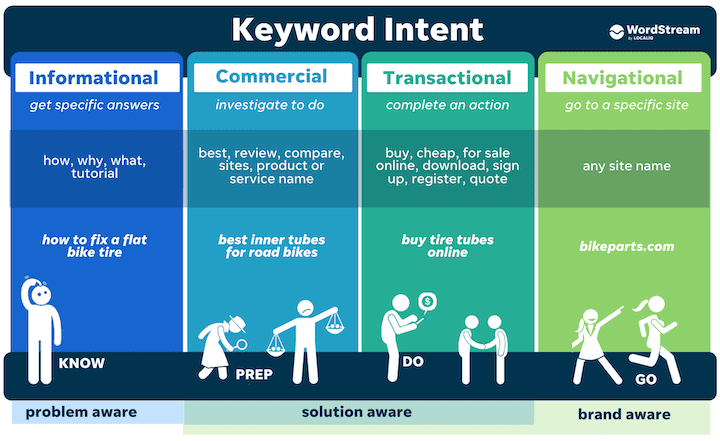
Split campaigns by intent, not by guesswork. Create separate buckets for Branded, Service + City, “Near me,” Condition + Care Level, and Competitor. Keep one tight theme per ad group and stick to exact and phrase match so you control what shows. Target a sane radius around the community and set location options to “Presence” so you don’t pay for people researching from another state.
12. Write ads that qualify the click
Your best ad says exactly who you are, where you are, and what to do next. Put the city and care level in the headline. Add pricing ranges, tour availability, and a real benefit. Use call extensions and a lead form extension so mobile users can book without hunting.
Example:
- Headlines: Assisted Living in Scottsdale | Tours This Week | Studios From $X
- Path: /assisted-living/scottsdale
- Description: Personal tours available this week. Pricing ranges and availability today. Call or book online in under 60 seconds.
13. Build landing pages that answer the next question
Families click because they want a decision, not a brochure. Put a clear promise at the top, then show pricing ranges, a 60–90 second walk-through video, photo gallery, tour calendar, reviews, and a short FAQ. Keep the phone number tappable and visible at all times. Add a map and driving time so “how do I get there” is handled without a bounce. Keep the page fast and single-purpose. One page per intent.

14. Protect the budget with smart negatives
Jobs, volunteer, training, nurse, free, definition, wiki, scholarship, donation, hospice employment, CNA, RN. Add city names you don’t serve and competitor brands you’re not ready to bid on. Refresh negatives weekly from the search terms report. You’ll cut wasted spend and free budget for real buyers.
15. Match ad hours to people who can book the tour
If no one can answer, you just bought frustration. Run full hours when a human can pick up within five minutes. After hours, use an answering service trained to book tours, not just take messages, and give them two next-day slots to offer on every call.
16. Track calls and count only real conversations
Use unique numbers per channel. Play a short whisper so staff know the source before they say hello. Track call duration and mark conversions at a sensible threshold so robocalls don’t pollute your data. Record calls for quality checks and coaching.
17. Start simple on bidding, then let automation help
Begin with Maximize Conversions only after you have real conversions, or run manual CPC while you dial in targeting. When the data is stable, move to Target CPA that reflects your cost per tour goal. Add bid adjustments for high-value zip codes and strong devices once you see a pattern.
Content That Converts Families
Education earns trust. Trust books tours.
18. Explain cost and financing like a human
Families don’t need a spreadsheet. They need a clear path. Spell out what drives price (apartment type; care level; add-ons) and what’s included (meals; housekeeping; activities; transportation). Give a plain-English overview of common options: long-term care insurance, VA Aid & Attendance, bridge loans, family co-pay. Add a simple ranges table and answer the five questions you hear on every call.
Use straight talk: “Studios from $X; one-bedrooms from $Y. Care is priced after assessment. Book a tour for an exact quote.” Offer a printable financing guide and capture email so you can follow up when openings hit.
19. Show a day in the life, not a brochure
A 60–90 second video beats ten paragraphs. Script the arc: morning routine; meals; activities; staff interactions; quiet spaces; safety touchpoints. Keep the phone vertical for mobile, add captions, and open with motion in the first two seconds. Post to GBP, the landing page, and your follow-up emails.

End every clip with a next step: “Tours available this week. Pick a time that works.” One video per care level is enough to start.
20. Make safety and wellness tangible
Families want proof, not promises. Create short pages for the things that lower risk: medication management, fall prevention, emergency response, caregiver training, memory care programming. Show how each works in practice, who oversees it, and what families can expect in week one.
Use photos of real spaces and equipment. Keep examples HIPAA-safe and resident-anonymous. Link these pages from every conversion page so nervous buyers can calm themselves without leaving.
21. Give them a tour checklist that makes them feel smart
Most people tour once in a lifetime. Hand them the script. Publish a simple checklist: questions to ask, things to notice, documents to bring, how to compare communities after the visit. Put it on the thank-you page and email it the moment a tour is booked.
Close with momentum: “After your tour, we’ll send a same-day recap with next-step options and a provisional quote.”
Social Proof at Scale
Great communities don’t just say “trust us.” They show proof everywhere a family looks.

22. Resident stories that feel real
Families want to picture life after move-in. Give them a story they can step into. Keep it simple – two short paragraphs with a clear before and after.
Outline you can reuse
- Before: the stressor that brought the family to you – falls, missed meds, isolation.
- Turning point: the moment they decided to tour; what clicked on the visit.
- After: the first 30 days – routine, safety, friends, peace of mind.
Skip names and health details unless you have written consent. A first name and an activity photo are enough. Publish on the landing page, share a snippet on GBP, and drop the full story into your follow-up email after a tour.
23. Build a proof library and put it where conversion happens
Don’t scatter testimonials and photos at random. Create one folder that holds your best 10 quotes, 10 photos, 3 short video clips, and any awards or badges. Tag each asset by the question it answers – safety, cost, activities, meals, staff tenure – then place those assets next to the matching section on your landing pages.

Add a short caption to every proof point so the takeaway is obvious. Use FAQ and Review schema so search engines can surface rich results. The goal is simple: when a daughter scrolls, she never hits a section that asks for trust without showing proof.
24. Make proof a monthly ritual
Proof doesn’t collect itself. Pick one day each month and run a light production sprint:
- Snap new photos during two activities and one mealtime.
- Record a 20-second staff hello on a phone – vertical, captions on.
- Ask two families for short quotes after a positive interaction.
- Update GBP with the best shots and post one quick update.
- Refresh the landing page module with one new quote and one new photo.
It’s easier to keep proof fresh when it’s on the calendar. Consistency beats perfection, and fresh signals raise confidence long before a family speaks to you.
Healthcare & Community Referrals
Warm handoffs fill calendars faster than any ad. If you’re invisible to the people families already trust, you’re leaving move-ins on the table.
25. Start with the sources that move the needle
Your next residents are already in someone else’s care path. Prioritize discharge planners, geriatricians, home health, PT/OT, hospice, senior centers, faith leaders, and veteran organizations. Give each source one direct line that rings a human who can book a tour. Share a simple one-pager with eligibility, care levels, today’s availability, and your fastest way to schedule.

What goes on the one-pager
- Who you serve – AL, MC, respite.
- What makes you safe and reliable – staff ratios, on-call RN, medication management.
- How fast you can act – same-day tours, 24–48 hour move-in when appropriate.
- Direct line and a QR to book a tour.
26. Build a light cadence you can keep
Relationships compound if you show up the same way every month. Week 1, introduce yourself and drop the one-pager. Week 2, bring something useful – a home safety checklist, dementia communication tips, fall-prevention handout. After that, send a short monthly text with current openings and a direct line. Host a quarterly lunch-and-learn. Log every touch in your CRM so you remember who prefers text, who prefers email, and who books by phone.
Availability text you can send
“Dr. Lee, we have two memory care openings this week and same-day tours. Direct line: [number]. If a family needs help today, we’re ready.”
27. Make the warm handoff effortless
Clinicians and community leaders are busy. Give them scripts that take 10 seconds and a handoff form that takes 30. Keep every message HIPAA-safe.
- Script for the referrer: “I’m connecting you with [Your Name] at [Community]. They can tour today and explain pricing. You’ll be in good hands.”
- Text from the referrer to the family: “Hi [First Name], this is [Referrer]. [Community] can tour today and walk you through options. [Your Name] at [number] can help.”
- Your immediate follow-up: Call within 5 minutes. If no answer, send: “This is [Your Name] at [Community]. We have tours today at 2:00 or 4:30. Which works better?” Then email a same-day recap with two times, the one-pager, and directions.
Keep a simple scoreboard: referrals received, tours booked from referrals, move-ins from referrals. When a source sends three families who tour, show up with lunch and a thank you. Small gestures turn occasional referrals into a steady pipeline.
Final words
Occupancy grows when you run a few engines well and never stop: GBP + reviews; high-intent search + conversion pages; warm referrals; speed-to-lead; clean tracking. Pick three plays, ship them this week, and judge them by tours and move-ins — not vanity clicks.
If you want a fast, focused rollout, get a 30-day plan, and we’ll map the work step by step, book a call with our team. Prefer proof first? See what similar communities achieved.
Already moving and need targeted help:
- Increase tours and move-ins
- Optimize your Google Business Profile
- Capture “near me” searches
- Reviews and response playbook
- Build a physician and community referral flywheel
Start small; move quickly; keep what works. The calendar will tell you when you’re on the right track.
